
Effective employee cybersecurity training is short, repeated through the year and built around the threats your staff actually see: phishing, payment-change requests, weak logins and unreported mistakes. A single annual video does not change behavior. The programs that work combine onboarding, brief refreshers, realistic simulations and a clear way to report problems. For a small business without an IT department, the easiest way to keep this going is to hand it to the team already responsible for your security. At Techbleed, our cybersecurity services for Glendale and Greater Los Angeles businesses come with a dedicated point of contact.
TL;DR
- Train at hire and at least once a year, but add short refreshers every few months. Studies show that frequent, practical training changes behavior more than annual courses.
- Cover phishing and social engineering, passwords and multifactor authentication (MFA), data handling, device and remote-work safety, and how to report an incident.
- Make reporting safe. Staff who fear blame stay quiet, and quiet is what attackers need.
- Measure behavior, not attendance: click rate, report rate and time to report.
- Leadership has to take part. Training that executives skip is training that staff skip.
Table of Contents
- Why training is a business risk issue, not an HR task
- What employee cybersecurity training should cover
- How often to train
- Make training stick: practical and specific
- Build a reporting culture
- How to measure whether it works
- What to do about your own situation
- Where Techbleed fits
- Our perspective
- FAQ
- Sources
Why training is a business risk issue, not an HR task
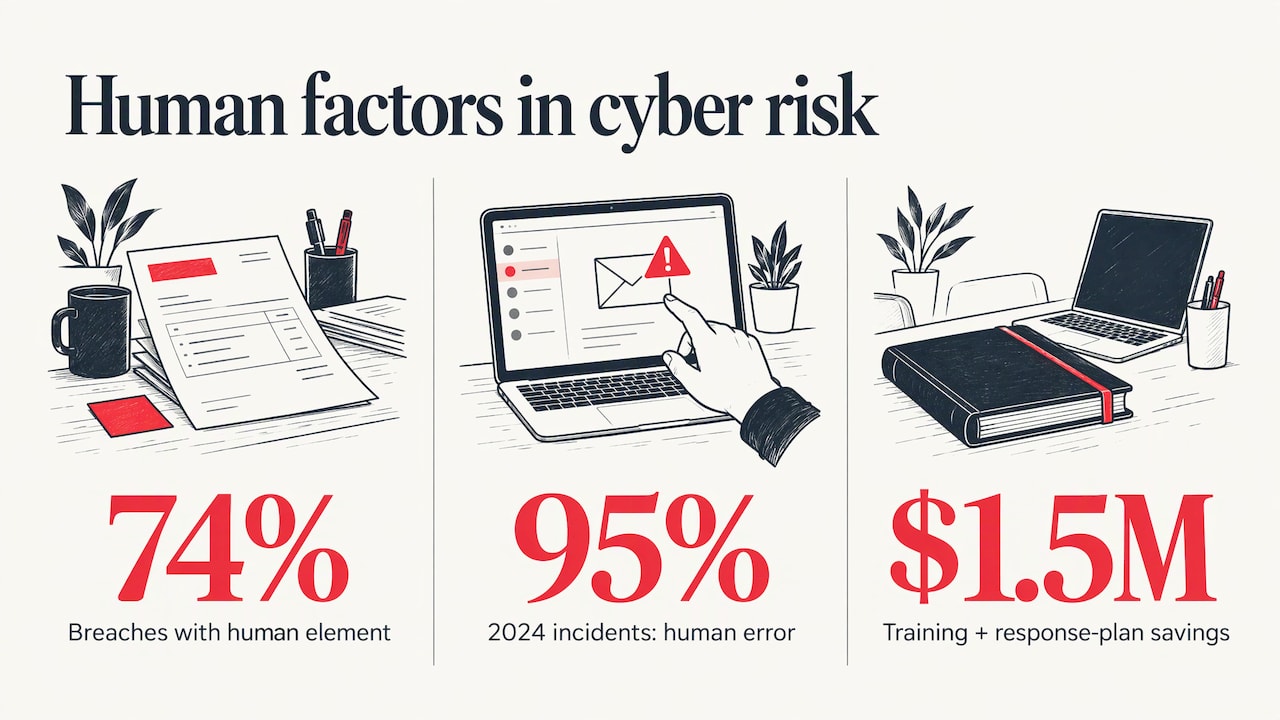
Most attacks on small companies do not start with a technical exploit. They start with a person: an invoice that looks right, a login page that looks familiar, a message that appears to come from the owner. CompTIA cites the Verizon 2023 Data Breach Investigations Report finding that 74% of breaches involve the human element. The same CompTIA article reports that, in the IBM 2023 Cost of a Data Breach Report, organizations with security awareness training and incident response plans cut breach costs by $1.5 million.
The Conference of State Bank Supervisors, in a September 2025 fact sheet, says human error was cited as a contributing factor in 95% of cyber incidents in 2024. Your firewall and email filtering catch a great deal, but the message that gets through lands in front of an employee. That employee is your last control.
CISA, the federal cybersecurity agency, makes the same point in its Cyber Essentials toolkit: staff are often the first line of defense, and each aware employee becomes another sensor that can spot an attack early.
What employee cybersecurity training should cover
You do not need a long curriculum. You need the topics that match what your people face every day. The Center for Internet Security’s Control 14, as laid out on MassCyberCenter’s small-business baseline page, lists the core subjects. Here they are in plain terms, with what each means in a small office.
Phishing and social engineering
Social engineering means tricking a person into doing something rather than breaking into a system. The Control 14 safeguards name phishing, pretexting (inventing a believable story to get information) and tailgating (following someone through a secured door). Teach staff to look at the sender address, to distrust urgency, and to confirm unusual requests through a second channel such as a phone call to a known number.
Business email compromise is the version that costs the most. A criminal impersonates a vendor or executive and asks for a wire transfer or a changed bank account. Our guide to business email compromise and whaling attacks walks through how these requests look. A simple rule helps: no payment detail changes without a call-back to a number already on file.
Passwords, MFA and credentials
The same CIS control calls for training on authentication best practices: multifactor authentication, password composition and credential management. In practice that means a company password manager, MFA on email and every cloud app, and a rule that nobody approves an MFA prompt they did not trigger.
Data handling
Staff should know how to identify, store, transfer, archive and destroy sensitive data, and the guidance includes clear-screen and clear-desk habits. Law firms, medical offices and accountants hold client data that carries legal duties, so this module deserves extra time. Sensitive identifiers such as Social Security numbers are a good example of data that should never travel by ordinary email or sit in shared folders. Protecting Social Security numbers is a useful topic for anyone who handles applicant or client records.
Devices, networks and remote work
Control 14 includes the dangers of insecure networks, including how to configure a home network for remote workers. Teach staff to use the company VPN or secure remote access, keep devices updated and report missing updates. Our practical guide to secure remote access covers the setup side.
Reporting incidents
The same list includes recognizing and reporting security incidents and the causes of unintentional data exposure. This is the module that turns a mistake into a contained event. An employee who clicks a bad link and tells you within minutes gives you time to reset a password and isolate a laptop. An employee who hides it gives the attacker days. Our list of signs your business has been hacked is worth sharing with the whole team.
Newer topics: AI tools
The Center for Internet Security aside, many current awareness programs now add responsible use of generative AI, such as never pasting client data into a public chatbot. Add a short written rule on this, since staff are likely already using these tools.
How often to train
There are three answers, depending on how much protection you want.
The minimum. CIS Control 14.1 requires a security awareness program with training at hire and at least annually, with content reviewed and updated each year or when significant changes occur (MassCyberCenter). Annual training has also long been seen as the floor in financial institutions, and the CSBS fact sheet notes that ISACA recommends training every four to six months to help people retain what they learned.
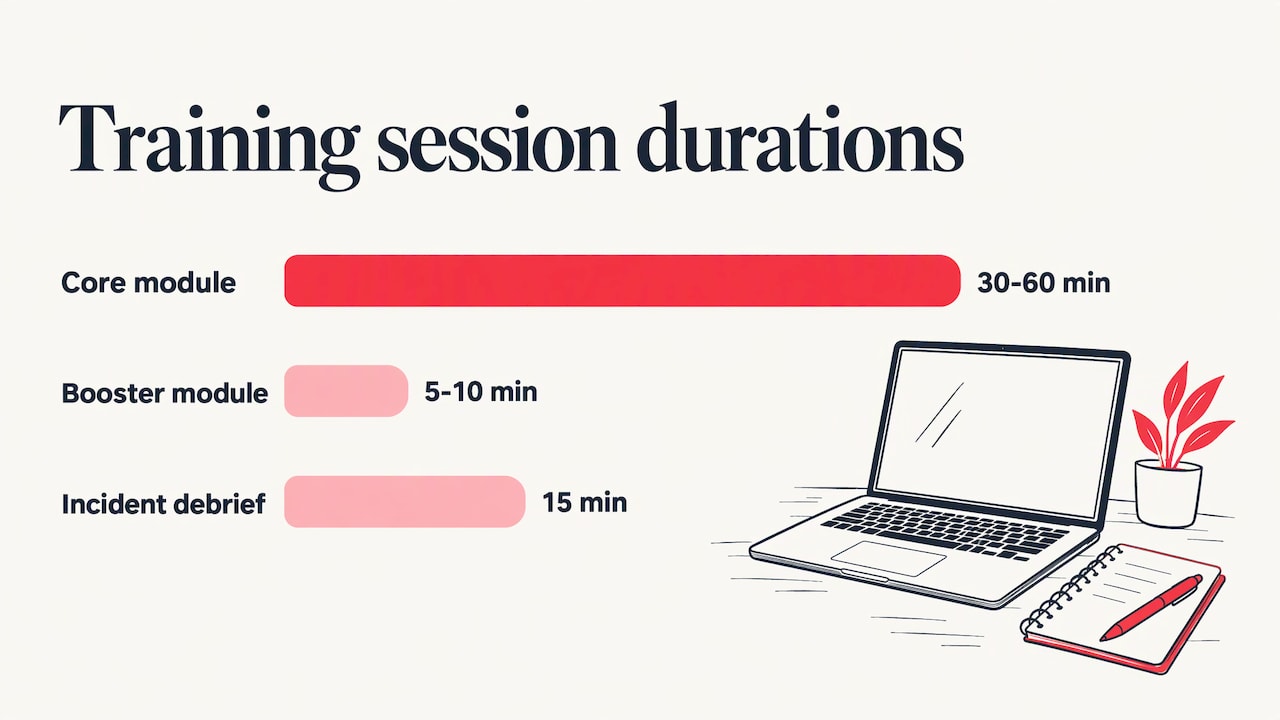
The better pattern. A January 2025 study in the Data: Journal of Information Systems and Management tested a 30 to 60 minute core module, instant feedback after a failed simulation and 5 to 10 minute booster modules every three to four months. Phishing failure rates fell from 11.2% to 7.5%, and report rates doubled from 14% to 28%. Confirmed monthly phishing incidents dropped 31%, from 14.2 to 9.8.
The takeaway for a small business. One long session a year is a compliance record, not a defense. A workable rhythm looks like this:
| When | What | Time |
|---|---|---|
| First week of employment | Core module covering all topics above | 30 to 60 minutes |
| Every 3 to 4 months | Booster on one current threat | 5 to 10 minutes |
| Monthly or more often | Simulated phishing email with immediate coaching | Seconds to a few minutes |
| Once a year | Review and update of content and policies | A short meeting |
| After any real incident | Brief debrief with the affected team | 15 minutes |
NIST’s Building a Cybersecurity and Privacy Learning Program (SP 800-50r1, September 2024) supports the same idea. It says awareness activities should run throughout the year, using tools such as logon-screen messages, newsletters and posters, with Cybersecurity Awareness Month in October as one anchor point.
Make training stick: practical and specific
Knowing about threats is not the same as acting safely. A peer-reviewed article on security awareness training for the workforce finds that compliance-based training sets only a minimum baseline, and that awareness alone does not produce behavior change. Employees need practical, prioritized steps tied to their own duties. Without them, the authors write, people end up anxious and powerless.
In a small business, that translates into a few habits:
- Teach to the job. Accounts payable needs payment-fraud scenarios. Reception needs visitor and phone-pretext scenarios. Attorneys and paralegals need client-data handling.
- Pick the behavior first. CISA’s Cyber Essentials guidance advises identifying the specific behavior you want to change, then building training around it. “Report any suspicious email using the report button” is a behavior. “Be careful online” is not.
- Coach at the moment of failure. Immediate feedback after a simulated click is what the study above built into its program. Do not punish; explain what the tell was.
- Put it in business terms. The same peer-reviewed authors note that framing security around mission, revenue and reputation helps win management support and personal ownership.
- Run it from the top. CISA’s Cyber Guidance for Small Businesses recommends talking about cybersecurity with direct reports, including security updates in regular staff communications and setting quarterly security goals tied to business goals. It also advises formally training all staff on MFA, software updates, avoiding suspicious links and escalating suspicious activity, and hosting quarterly tabletop exercises.
A tabletop exercise is simply a talk-through of a scenario, such as “our bookkeeper’s email was taken over; what do we do in the first hour?” It costs one meeting and reveals who owns which decision.
Build a reporting culture
The CSBS fact sheet stresses that employees should have no hesitation or fear of reprisal when reporting suspected or actual incidents. It also says management should track training completion and have escalation steps for noncompliance, including for executives and board members with system access.
That pairing matters. Make it plain that reporting early is rewarded, and that the owner and the senior partners complete the same training as everyone else. Publish one way to report, such as a dedicated mailbox or a button in the email client, and say who responds. Practical guidance on spotting and stopping these scams is in our article on preventing phishing attacks.
Reporting behavior is also where simulations pay off. Layered defenses against fraud rely on people noticing and flagging oddities, as in this overview of layered fraud prevention for online merchants. Your staff are one of those layers.
How to measure whether it works
Completion certificates show who clicked through a course. They do not show who would catch a fake invoice. The CSBS fact sheet notes that phishing exercises give trackable, real-time metrics: open rate, click rate and report rate. These show which topics need a refresher.
For a small business, track a handful of numbers every quarter:
- Click rate: the share of staff who click a simulated phishing link. It should fall over time.
- Report rate: the share who report the simulation. It should rise. In the journal study above it doubled.
- Time to report: how many minutes pass between delivery and the first report.
- Repeat clickers: people who fail more than once. Offer them coaching rather than blame.
- Real incidents: the number of genuine phishing or fraud attempts that reached staff, and how many were reported.
NIST’s guidance also recommends metrics and evaluation methods so you can regularly improve the program. Review them at the same meeting where you update the content each year.
What to do about your own situation
A 15-person firm does not need an enterprise program. It needs a short onboarding module, a quarterly rhythm, a reporting channel, and someone who owns the schedule and the results. The trouble is that the owner or office manager usually has no time to run it, and nobody inside can tune it to the firm’s actual exposure.
The training works best when it is tied to the technical controls behind it. If you train staff to use MFA and a password manager, those tools have to be deployed. If you tell staff to report suspicious email, someone has to read the reports and act. If an employee leaves, access has to end the same day; our employee IT offboarding checklist covers that. For law firms, which carry confidentiality duties, our law firm cybersecurity checklist shows what to put in place alongside training.
Where Techbleed fits
We provide managed IT, cybersecurity, business continuity and cloud services to small and mid-sized businesses in Glendale and the Greater Los Angeles area, and each client gets a dedicated point of contact instead of needing an in-house IT department. That matters for training, because the person who knows your systems is the person who can help you keep employee awareness current. You can see what we offer on our security awareness training page, and our managed IT plans show how security fits into day-to-day support.

If you want to talk through a program sized for your team, start from our cybersecurity services overview.
Our perspective
We have one view on training: it only counts if it changes what people do on a Tuesday afternoon with a full inbox.
Small businesses tend to buy a course, record that everyone finished it, and consider the risk handled. Then a convincing invoice arrives and the person who sees it has no idea who to tell, or is afraid to. The research points the same way. Awareness without clear, practical steps leaves people uneasy and no safer.
That is why we treat training as part of managed security rather than a separate product. Our approach is proactive: prevent the problem, keep the tools your staff rely on working, and keep one familiar person they can call. When a team member knows exactly who to contact, a mistake becomes a short conversation instead of an incident.
Start small and keep it going. A short module at hire, a few minutes every quarter, a simple reporting habit and an owner who reads the results will protect your business better than any single big session.
John
FAQ
How long should employee cybersecurity training take?
A core session at hire can run 30 to 60 minutes. After that, 5 to 10 minute boosters every three to four months are enough to keep skills fresh, as in the 2025 study cited above. Short and frequent beats long and rare.
Is annual training enough?
Annual training at hire and once a year is the minimum in CIS Control 14.1. Research and professional guidance, including ISACA’s recommendation of every four to six months, point to more frequent refreshers. Combine the annual session with quarterly boosters and regular simulated phishing.
What is the difference between security awareness and security training?
Awareness is the ongoing reminder: newsletters, posters, short messages, tips. Training is the structured teaching of specific skills, such as spotting a payment-change scam. NIST’s learning program guidance treats both as parts of one program, and you need both.
Who should take the training?
Everyone with access to company email, systems or data, including owners, partners, executives, temporary staff and contractors. The CSBS fact sheet says escalation for noncompliance should apply to executives and board members with system access too.
How do I know if the training is working?
Watch behavior. Falling click rates, rising report rates and shorter time to report on simulated phishing show that staff are applying what they learned. Completion percentages alone do not.
Sources
- CompTIA: Top Reasons Cybersecurity Training Protects Your Organization
- CSBS: Cybersecurity Awareness Training fact sheet, September 2025
- CISA: Cyber Essentials toolkit
- CISA: Cyber Guidance for Small Businesses
- MassCyberCenter: Train Your Employees (CIS Control 14)
- Data: Journal of Information Systems and Management, January 2025
- NIST SP 800-50r1: Building a Cybersecurity and Privacy Learning Program
- NCBI/PMC: Security Awareness Training for the Workforce
Recommended
- Why Cybersecurity Matters for Small Businesses
- Signs Your Business Has Been Hacked
- Secure Remote Access for Business: A Practical Guide
- Phishing and Whaling Attacks: How Businesses Can Prevent Costly Cyber Scams